AI search in practice
Our business is missing from AI search. What should we fix first?
From unreadable pages to citations, visits and inquiries: a symptom-based decision table and practical work-request examples for clinics, tax advisers and accountants reviewing their AI search visibility.
Different kinds of absence call for different work
When an AI service cannot find a newly launched clinic or professional firm's website, it can be hard to decide whether to publish more articles or change the site. Start by identifying which question was asked and what was missing from the answer. A service that cannot read a page even when given its URL needs a different investigation from one that recognizes the business but leaves it out of service-related answers.
Google describes crawling, indexing and serving search results as separate stages.[1] The decision table below is EntityClinic's practical extension of that distinction. It does not mean every AI service has the same search architecture.
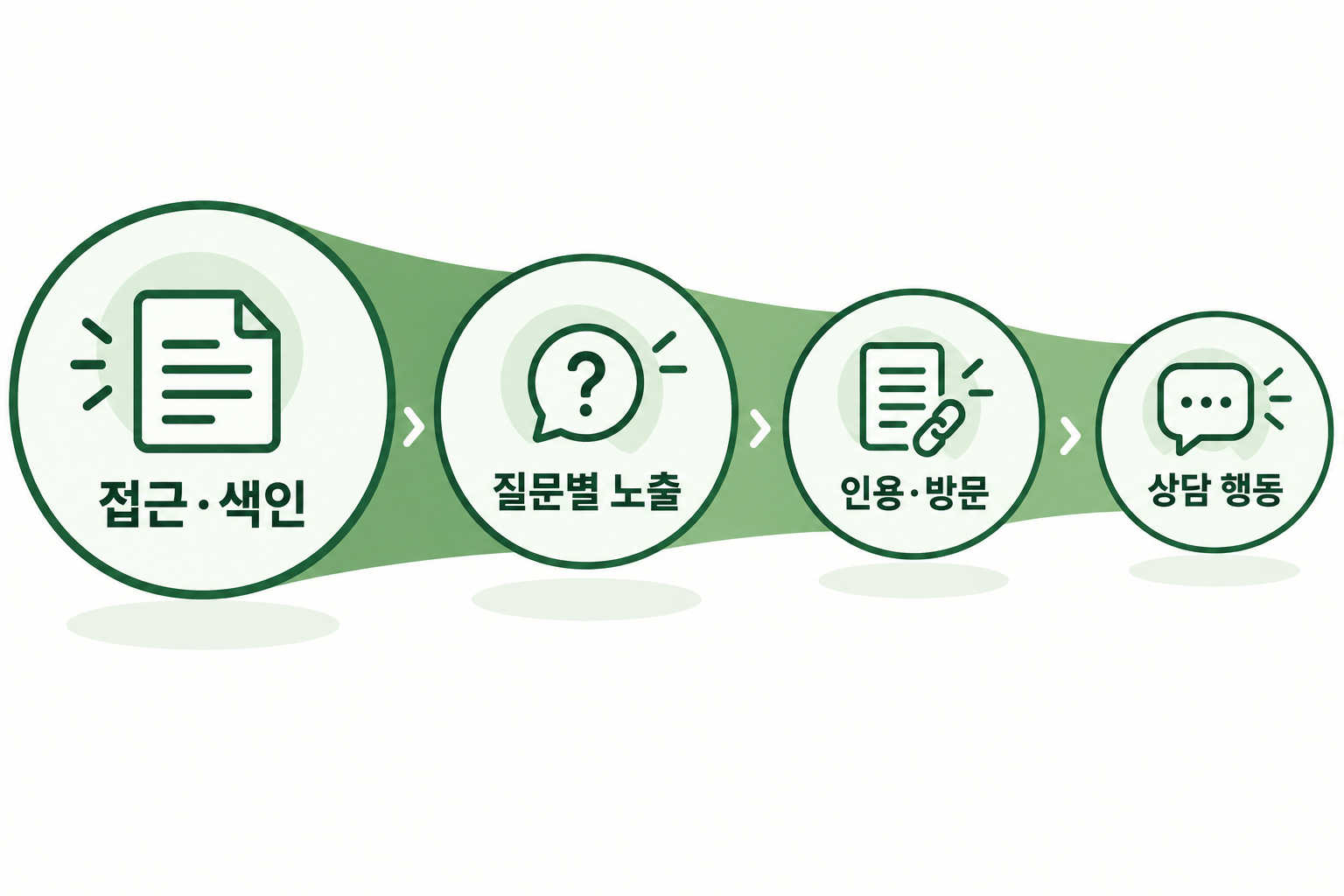
| What you observe | Evidence to check first | First task to assign |
|---|---|---|
| The service cannot read the page even with its URL | Response, returned content and blocking logs for that request | Ask the development or hosting team to investigate access |
| It finds the business name but omits it from service questions | Topic-page indexing, answer content and competing sources | Fill information gaps relevant to customer questions |
| It cites the site, but visits are not confirmed | Actual cited URL, traffic records and measurement settings | Check citations and visit data separately |
| People visit but do not continue to an inquiry | Landing page, inquiry button and submission process | Review how customers choose their next action |
1. Use request records to investigate reading failures
An AI response saying it cannot access the site is not enough to establish that the server blocked it. Record the time, URL and service, then ask the developer to investigate that request. A page opening in your browser does not establish that a search crawler read it. Even a 200 response needs a content check: did it contain the article, or a login page or security challenge?
Check hosting and CDN access policies as well as robots.txt.[2] A request calling itself Googlebot is not, by that fact alone, a verified Google request. Google documents checks using its published IP ranges or DNS verification.[3] Focus the work on access problems confirmed for the public page.
Distinguish permission for ChatGPT search from permission for training. OpenAI's official documentation identifies OAI-SearchBot as a search crawler and GPTBot as a crawler whose content may be used for training; their settings are independent. ChatGPT-User is used for certain user-initiated page visits and does not determine search eligibility.[4] Visibility in AI search does not require you to allow every use of your content for training.
2. After checking indexing, compare the page with the customer's question
In Google Search Console's URL Inspection tool, distinguish stored index information from a live test. A successful live test does not mean indexing has finished. Check the last crawl date and Google's selected canonical URL too.[5] This is evidence about Google, not proof of another AI service's index status.
If the page is technically readable, examine its content next. Suppose an accounting firm's introduction says only that it offers a broad range of accounting services, while the customer asks what a company should organize before its first external audit. Recognizing the firm's name is different from finding useful source material for that question. The page could explain preparation materials, responsibilities and the scope to clarify at an initial consultation, based on the services the firm actually provides.
For a clinic, this might mean explaining what to confirm before a visit; for a tax advisory firm, who a bookkeeping consultation is for and how to prepare. Have the appropriate professional verify material involving qualifications, clinical judgment or tax advice, and identify the author and supporting evidence. Google also emphasizes original information that helps readers and clear sourcing.[6] Check whether the page resolves the customer's uncertainty, rather than how often it repeats a term.
3. Separate answers given your URL from answers that discover it
An answer to a request to explain a supplied website helps test page comprehension. It is different evidence from appearing in an answer to a customer who does not know your business. Record named-business questions, service questions without a business name, and reading tests with a supplied URL separately.
Use wording a customer might naturally use for questions without a business name, and do not insert the company's name or the desired answer. Start each run in a new conversation. Record the service and displayed model, whether search was used, region, language, time and exact prompt. A new conversation can reduce the influence of the preceding dialogue, but it does not establish that all personalization or service variation has been removed.
Check separately whether the answer names the business, links to your URL as a source, and connects that source to a particular claim. Keep execution errors and runs without search in the record; do not select only favorable screenshots. One absence is a starting point for investigation, not a confirmed diagnosis.
4. After citations, check visits and inquiries separately
An AI citation does not establish that a customer clicked the link or requested a consultation. Compare the actual destination URL with your web analytics records. Do not label visits as AI results without evidence for that classification. Google includes AI Overviews and AI Mode performance in Search Console's Web search type, so that total is not a count of citations across all AI services.[2]
Follow the customer journey on a phone after landing on the site. Is it clear who the consultation is for and which services are offered? Does the button open the correct channel, and can the customer tell when a submission is complete? Separating button clicks, completed submissions and actual consultations helps distinguish content work from changes to the inquiry process.
Give the person responsible one problem and an outcome to verify
Instead of saying that AI search is not working, you could ask: ‘Our official website appears for questions using our business name, but it is not cited for an external-audit preparation question without our name. Please check the target URL's indexing and whether its content adequately explains preparation materials and the scope of consultation.’ This is an example of a work request, not an actual business's measurement result.
For each change, record the URL, work performed, responsible person and verification date, then measure again with the same questions. Address confirmed problems in access, indexing, content or conversion first. Google does not require a separate AI file or special structured data for its AI search features, and meeting the basic requirements does not guarantee visibility.[2] Being able to explain the improvement needed also helps define the next task and its budget.
Official Google and OpenAI sources were checked on September 12, 2026. The table and review sequence are EntityClinic's practical recommendations, and the examples do not represent actual client results.
- Have you specified the question and the target URL?
- Have you checked readability and indexing separately?
- Have you separated named-business questions, unnamed questions and supplied-URL tests?
- Do you have definitions and original records for mentions, citations, visits and inquiries?
- Have you assigned the next change and the person who will verify it?